Steps in Editing an XML using LINQ and C#
1. Get the path of your XML file.
string fullXmlPath =
System.IO.Path.GetDirectoryName(System.Windows.Forms.Application.ExecutablePath) + "file name.xml";
2. Load the path.
XElement LogXmlDocument = XElement.Load(fullXmlPath);
3. Prepare the data.
var navResultsPlant = LogXmlDocument.Descendants().Where(
e => e.Attribute("id").Value == id).FirstOrDefault();
if (navResultsPlant != null)
navResultsPlant.Remove();
4. Save.
LogXmlDocument.Save(fullXmlPath);
Showing posts with label XML. Show all posts
Showing posts with label XML. Show all posts
Thursday, October 22, 2009

Wednesday, August 26, 2009
Resource Stream in C# .Net
Steps on how to add and retrieve an instance of your resource file:
1. Right click the file, select Properties.
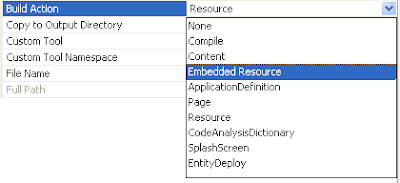
2. Under Build Action, select Embedded Resource as shown below
3. Syntax in retrieving an instance:
FrameworkElement content = new FrameworkElement();
Assembly asm = Assembly.GetExecutingAssembly();
Stream sre = asm.GetManifestResourceStream("namespace here);
content = XamlReader.Load(sre) as FrameworkElement;
1. Right click the file, select Properties.
2. Under Build Action, select Embedded Resource as shown below

3. Syntax in retrieving an instance:
FrameworkElement content = new FrameworkElement();
Assembly asm = Assembly.GetExecutingAssembly();
Stream sre = asm.GetManifestResourceStream("namespace here);
content = XamlReader.Load(sre) as FrameworkElement;
Monday, August 24, 2009
XML and LINQ

How to query in C# using LINQ
XDocument xmlFile = XDocument.Load(filename);
var xt = from y in xmlFile.Descendants("Users").Elements("details")
where y.Attribute("userName").Value == x
select new TempClass
{
Name = y.Element("userdetails").Attribute("userFirstName").Value
};
Download Sample Code Here
Subscribe to:
Posts (Atom)
