1. Simple Inline XAML
2. Silverlight does not support dynamic resources
Only static resources
3. No XPath binding
4. Triggers
workaround
Expression.Samples.Interactivity
System.Windows.Interactivity
Download the example here
5. Silverlight compiled DLL's can only be reference to your Silvelight project.
6. DocumentViewer Control
7. Adorner
8. MultiBindings
9. Updatetrigger
10. Cannot read and write to your local disk
Example:
HtmlPage.Window.Navigate(new Uri("C:\\Users\\userName\\Downloads\\test.pdf"), "_blank");
HtmlPage.Window.Navigate(new Uri("C:\\Users\\userName\\AppData\\LocalLow\\Microsoft\\Silverlight\\is\\t1frcinf.y5b\\adbxgs00.suq\\1\\s\\i4j5zwj5lwo3dexs43ahtvmg2bjlsx11spczjmw5ud3c3dignoaaahea\\f\\MHVStore\\WhatsNewInSilverlight4.pdf"), "_blank");
*** You can access the absolutepath of your IsolatedStorage but it is not the best practice.
10. Refection
Showing posts with label WPF. Show all posts
Showing posts with label WPF. Show all posts
Wednesday, April 7, 2010

Tuesday, April 6, 2010
C# How to open a file
Syntax for opening a file is:
However this is not permitted in Silverlight 4.0
System.Diagnostics.Process.Start("FileNameHere");
However this is not permitted in Silverlight 4.0
Monday, November 23, 2009
Eventing in MVVM pattern without using Caliburn Framework
Steps:
1. You need to have an EventBehaviourFactory class. You can copy this code.
public static class EventBehaviourFactory
{
public static DependencyProperty CreateCommandExecutionEventBehaviour(RoutedEvent routedEvent, string propertyName, Type ownerType)
{
DependencyProperty property = DependencyProperty.RegisterAttached(propertyName, typeof(ICommand), ownerType,
new PropertyMetadata(null,
new ExecuteCommandOnRoutedEventBehaviour(routedEvent).PropertyChangedHandler));
return property;
}
///
/// An internal class to handle listening for an event and executing a command,
/// when a Command is assigned to a particular DependencyProperty
///
private class ExecuteCommandOnRoutedEventBehaviour : ExecuteCommandBehaviour
{
private readonly RoutedEvent _routedEvent;
public ExecuteCommandOnRoutedEventBehaviour(RoutedEvent routedEvent)
{
_routedEvent = routedEvent;
}
///
/// Handles attaching or Detaching Event handlers when a Command is assigned or unassigned
///
///
///
///
protected override void AdjustEventHandlers(DependencyObject sender, object oldValue, object newValue)
{
UIElement element = sender as UIElement;
if (element == null) { return; }
if (oldValue != null)
{
element.RemoveHandler(_routedEvent, new RoutedEventHandler(EventHandler));
}
if (newValue != null)
{
element.AddHandler(_routedEvent, new RoutedEventHandler(EventHandler));
}
}
protected void EventHandler(object sender, RoutedEventArgs e)
{
HandleEvent(sender, e);
}
}
internal abstract class ExecuteCommandBehaviour
{
protected DependencyProperty _property;
protected abstract void AdjustEventHandlers(DependencyObject sender, object oldValue, object newValue);
protected void HandleEvent(object sender, EventArgs e)
{
DependencyObject dp = sender as DependencyObject;
if (dp == null)
{
return;
}
ICommand command = dp.GetValue(_property) as ICommand;
if (command == null)
{
return;
}
if (command.CanExecute(e))
{
command.Execute(e);
}
}
///
/// Listens for a change in the DependencyProperty that we are assigned to, and
/// adjusts the EventHandlers accordingly
///
///
///
public void PropertyChangedHandler(DependencyObject sender, DependencyPropertyChangedEventArgs e)
{
// the first time the property changes,
// make a note of which property we are supposed
// to be watching
if (_property == null)
{
_property = e.Property;
}
object oldValue = e.OldValue;
object newValue = e.NewValue;
AdjustEventHandlers(sender, oldValue, newValue);
}
}
}
2. Create a relay command class which inherits ICommand Interface. You can copy this code. An ICommand contains methods to execute commands. A command can be executed many times, and the parameter values can vary. This interface is mandatory on commands.
Namespace: System.Windows.Input
Assembly: PresentationCore (in PresentationCore.dll)
public class RelayCommand:ICommand
{
#region private fields
readonly Action
1. You need to have an EventBehaviourFactory class. You can copy this code.
public static class EventBehaviourFactory
{
public static DependencyProperty CreateCommandExecutionEventBehaviour(RoutedEvent routedEvent, string propertyName, Type ownerType)
{
DependencyProperty property = DependencyProperty.RegisterAttached(propertyName, typeof(ICommand), ownerType,
new PropertyMetadata(null,
new ExecuteCommandOnRoutedEventBehaviour(routedEvent).PropertyChangedHandler));
return property;
}
///
/// An internal class to handle listening for an event and executing a command,
/// when a Command is assigned to a particular DependencyProperty
///
private class ExecuteCommandOnRoutedEventBehaviour : ExecuteCommandBehaviour
{
private readonly RoutedEvent _routedEvent;
public ExecuteCommandOnRoutedEventBehaviour(RoutedEvent routedEvent)
{
_routedEvent = routedEvent;
}
///
/// Handles attaching or Detaching Event handlers when a Command is assigned or unassigned
///
///
///
///
protected override void AdjustEventHandlers(DependencyObject sender, object oldValue, object newValue)
{
UIElement element = sender as UIElement;
if (element == null) { return; }
if (oldValue != null)
{
element.RemoveHandler(_routedEvent, new RoutedEventHandler(EventHandler));
}
if (newValue != null)
{
element.AddHandler(_routedEvent, new RoutedEventHandler(EventHandler));
}
}
protected void EventHandler(object sender, RoutedEventArgs e)
{
HandleEvent(sender, e);
}
}
internal abstract class ExecuteCommandBehaviour
{
protected DependencyProperty _property;
protected abstract void AdjustEventHandlers(DependencyObject sender, object oldValue, object newValue);
protected void HandleEvent(object sender, EventArgs e)
{
DependencyObject dp = sender as DependencyObject;
if (dp == null)
{
return;
}
ICommand command = dp.GetValue(_property) as ICommand;
if (command == null)
{
return;
}
if (command.CanExecute(e))
{
command.Execute(e);
}
}
///
/// Listens for a change in the DependencyProperty that we are assigned to, and
/// adjusts the EventHandlers accordingly
///
///
///
public void PropertyChangedHandler(DependencyObject sender, DependencyPropertyChangedEventArgs e)
{
// the first time the property changes,
// make a note of which property we are supposed
// to be watching
if (_property == null)
{
_property = e.Property;
}
object oldValue = e.OldValue;
object newValue = e.NewValue;
AdjustEventHandlers(sender, oldValue, newValue);
}
}
}
2. Create a relay command class which inherits ICommand Interface. You can copy this code. An ICommand contains methods to execute commands. A command can be executed many times, and the parameter values can vary. This interface is mandatory on commands.
Namespace: System.Windows.Input
Assembly: PresentationCore (in PresentationCore.dll)
public class RelayCommand:ICommand
{
#region private fields
readonly Action
Tuesday, October 27, 2009
How to use DataTemplateSelector in WPF ContentControl
DataTemplateSelector provides a way to choose a data template based on the data object and the data-bound element.
Steps to implement DataTemplateSelector in ContentControl.
1. Create a class that inherits DataTemplateSelector.

2. Implement method SelectTemplate.
public override DataTemplate SelectTemplate(object item, DependencyObject container)
{
code here
}
3. In your XAML under resource, declare all data templates you wish to as example below.

4. Initialize your datatemplate selector class in reference to step number 1.

5. Under ContentControl:
Steps to implement DataTemplateSelector in ContentControl.
1. Create a class that inherits DataTemplateSelector.

2. Implement method SelectTemplate.
public override DataTemplate SelectTemplate(object item, DependencyObject container)
{
code here
}
3. In your XAML under resource, declare all data templates you wish to as example below.

4. Initialize your datatemplate selector class in reference to step number 1.

5. Under ContentControl:
Thursday, October 15, 2009
Caliburn: An Application Framework for WPF
Today, I've learned how to use caliburn framework in Model-View-View Model(MVVM) designed pattern.
Without using the application framework, you can set your event in your view.xaml by this:

in your view.cs, you need to hard code this:
void MouseEnter(object sender, MouseEventArgs e)
{
//code here
}
using the implementation above, it breaks the rule of MVVM, the view classes have no idea that the model classes exist, while the ViewModel and model are unaware of the view.
but using caliburn, you need to add this to your view.xaml by

in your viewmodel.cs,
public void OnMouseEnter(MouseEventArgs e)
{
//code here
}
Without using the application framework, you can set your event in your view.xaml by this:

in your view.cs, you need to hard code this:
void MouseEnter(object sender, MouseEventArgs e)
{
//code here
}
using the implementation above, it breaks the rule of MVVM, the view classes have no idea that the model classes exist, while the ViewModel and model are unaware of the view.
but using caliburn, you need to add this to your view.xaml by

in your viewmodel.cs,
public void OnMouseEnter(MouseEventArgs e)
{
//code here
}
Wednesday, August 26, 2009
Resource Stream in C# .Net
Steps on how to add and retrieve an instance of your resource file:
1. Right click the file, select Properties.
2. Under Build Action, select Embedded Resource as shown below
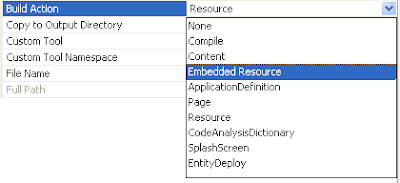
3. Syntax in retrieving an instance:
FrameworkElement content = new FrameworkElement();
Assembly asm = Assembly.GetExecutingAssembly();
Stream sre = asm.GetManifestResourceStream("namespace here);
content = XamlReader.Load(sre) as FrameworkElement;
1. Right click the file, select Properties.
2. Under Build Action, select Embedded Resource as shown below

3. Syntax in retrieving an instance:
FrameworkElement content = new FrameworkElement();
Assembly asm = Assembly.GetExecutingAssembly();
Stream sre = asm.GetManifestResourceStream("namespace here);
content = XamlReader.Load(sre) as FrameworkElement;
Monday, August 24, 2009
XML and LINQ

How to query in C# using LINQ
XDocument xmlFile = XDocument.Load(filename);
var xt = from y in xmlFile.Descendants("Users").Elements("details")
where y.Attribute("userName").Value == x
select new TempClass
{
Name = y.Element("userdetails").Attribute("userFirstName").Value
};
Download Sample Code Here
Subscribe to:
Comments (Atom)
